A business that sells through online marketplaces has to build a listing for every item it owns, and building one properly is slow. Someone identifies exactly which product is in front of them, finds the printed catalog number, and enters every attribute a buyer will search on. That averaged about ten minutes an item. The feature our team built averages about thirty seconds: photograph the item, and the identification and the attributes arrive already filled in.
That feature belongs to a SaaS platform Black Airplane designed and built to help teams catalog physical inventory and list it for sale online. The first version that worked took about a day: a vision model, a prompt, and a photo. Everyone who saw the demo wanted it. Almost everything built after that day was not the AI. It was the engineering that made the AI dependable: an evaluation benchmark, structured output contracts, a second provider on standby, defenses against confident nonsense, cost metering, and an interface that keeps people in charge.
Our team has since built that same layer into very different AI systems: a workspace platform where AI agents draft customer-facing actions, like email replies, that a human approves before anything is sent; a real-time product where an AI hosts a live group experience over text and voice; and a document-intake feature in a client’s back-office operations platform that turns uploaded vendor paperwork into reviewed, structured records. The products share almost nothing, yet the production disciplines are the same. This article walks through seven of them, using the identification feature as the through-line and the other systems where they make the point better. The distance between an AI demo and an AI product is what most teams underestimate, and it is what buyers of AI development should be asking about.
The conditions a demo never meets
Demos are persuasive because they run under the friendliest possible conditions: a good photo, a common item, a patient operator, and a healthy API on the other end. Production removes every one of those courtesies. The photo is blurry or sideways. The item is an obscure edition. The provider is down. The model answers with an apology instead of an answer, or with an answer that is fluent, confident, and wrong.
A feature used thousands of times a week meets all of these regularly. The demo answers one question: can the model do this at all? Production asks a harder one. What happens, specifically and by design, every time it can’t?
What follows are the seven disciplines that answering it required. The pattern is older than LLMs: Google’s researchers described machine-learning systems the same way a decade ago, a small model box surrounded by infrastructure. Each discipline covers a different way the feature can fail, so a gap in any of them eventually shows up in production.
Production pipeline
07 stations
- Input
- 01 Benchmark: 28-case golden set
- 02 Contract: Structured output
- 03 Fallback: Second provider
- 04 Sanitize: Hedges rejected
- 05 Meter: Token ledger
- 06 Profile: Honest timers
- 07 Human: Review and override
- Verified record
1. Measure before you commit: a 28-case benchmark changed our architecture
Before letting the feature anywhere near real data, we built an evaluation set: 28 real cases drawn from actual photos of varying quality, each recorded with the exact expected answer. Twenty-eight is small by research standards and transformative by product standards, because it converts “the demo feels accurate” into a number you can compare across models and prompts.
We then wrote a command-line harness that runs the entire pipeline, not just the model call, against that set with any combination of provider, model, and prompt. It scores three things separately: whether the right product was identified, whether the right edition was resolved, and how accurately each individual field was extracted. With the harness in place, we swept four prompt variants across three models and let the results decide the architecture.
The results were not what the leaderboards would have predicted.
Benchmark
28-case set · spring 2026
| Model | Items identified correctly | Tokens used |
|---|---|---|
| Gemini 2.5 FlashShipped as primary | 100% | ~14,000 |
| Claude Sonnet 4 | 85.7% | ~46,000 |
| Claude Haiku 4.5 | 78.6% | ~54,000 |
A perfect score says as much about the test set as about the model: going 28 for 28 told us the set needed harder cases, and the set has grown since.
First, reputation is a poor predictor of performance on a specific task. Gemini 2.5 Flash, the fast and inexpensive option, beat a larger and more expensive model on our workload while using roughly a third of the tokens. We would never have chosen it on reputation alone, and we would have paid more for worse results.
Second, prompt engineering matters most on models that are struggling. Our “guided” chain-of-thought-style prompt, the variant that looks the most sophisticated, was the worst performer on both Claude models, cutting identification accuracy by roughly two thirds. On Gemini, prompt choice barely mattered: three of our four variants scored identically. The published record agrees: a meta-analysis of more than 100 papers found chain-of-thought helps mainly on math and symbolic reasoning, and a separate study found it can reduce accuracy on visual recognition, which is exactly the shape of our task.
Third, the numbers made the architecture decision for us. Gemini became the primary provider and Claude became the fallback because the data said so, and the table is still the answer we give when someone asks why.
One caveat: these figures describe our task, our test set, and the model versions available in spring 2026. Models improve monthly, and a different task could produce the opposite ranking.
We know that because the same method later produced the opposite answer. In the real-time product, we benchmarked routing conversational moments to a cheaper model: it tied the mid-tier model on social scenes, at roughly a third of the cost and half the latency, but measurably regressed on reasoning-heavy ones. So that routing shipped off by default, ready to enable, with the evidence on file. That is why the harness stays around: it doubles as the monitoring plan. Models, prompts, and real-world inputs all drift, and re-running the golden set after each change is how the feature keeps proving it still works.
There is nothing special about 28. The right size is the one that makes the decision safe, which depends first on how close the contenders are. One case in our set was worth 3.6 points, so a two-point spread between models would have been noise, and even our 14-point gap is thinner evidence than it looks on 28 cases, the kind of margin eval statistics say to read with error bars. What made it safe to act on was repetition: the ranking held across all four prompt variants, and the winner also used a third of the tokens.
Size depends just as much on how many ways the task can go wrong: a single short answer needs far fewer cases than a form with fifteen fields, or a workload where the interesting failures hide in inputs you rarely see. We have built sets many times larger for tasks shaped like that. And when there is no labeled data to start from, the set gets built by running the feature, so it grows alongside the first version rather than preceding it. What matters is that the measurement exists before anyone relies on the feature.
2. Structured output is a contract
Early on we made structure non-negotiable in the identification pipeline, using each provider’s strongest mechanism for it: one provider responds against a declared response schema, and the other is called with forced tool use, so the reply arrives as arguments to a function we define rather than as free text. Temperature is set to zero and output length is capped, to hold the pipeline as close to repeatable as the models allow.
Then we treat the structured reply as untrusted input anyway. The parser strips the markdown fences models still occasionally wrap around JSON, validates that required fields are present, and, when parsing fails, records a failure with a reason and the tokens already spent rather than throwing an exception and losing the record.
The most useful change we made here was removing a field. Early versions asked the model which edition of a product the photo showed, something our own database could resolve more reliably, so we took it out of the extraction schema entirely. The model now extracts only what a model is uniquely able to see, and the system resolves the rest from records it can actually verify. Scoping the model down made the whole feature more accurate.
3. Design for the bad day: fallbacks, retries, and queues
A production AI feature with one provider has a single point of failure that you do not control, cannot see into, and cannot fix at 2 a.m. The identification pipeline runs two vision providers behind one interface with an identical contract; the response includes the content, the token counts, and which provider actually answered. If the primary fails, the request is logged and retried against the fallback automatically. The trigger is deliberately narrow: a genuine call failure, never “an answer we didn’t like.”
Resilience is layered in time as well. Each provider call carries a 60-second timeout with automatic retries and pauses at the HTTP layer. The identification itself runs as a queued background job with three attempts backing off at 10, 30, and 90 seconds, so the user’s upload never waits on a model. When every layer is exhausted, the job writes a failure status that the interface renders plainly: “Auto-identification failed,” with a retry button.
Those failure modes are designed in the interface too. If an identification takes longer than 60 seconds, the interface says so and offers a retry. If the live connection drops, a notice appears and the page falls back to polling. Every failure mode a user can experience has a designed state, because in production, “it usually works” is indistinguishable from “it’s broken” to the person it just failed for.
One more distinction matters here: retries are only safe when the action is safe to repeat. In the workspace platform that sends approved email replies, the send job is configured to run exactly once, with no automatic retry, and a reconciliation job sweeps every minute to resolve any send whose outcome is uncertain. A duplicate email to a customer is worse than a late one. Identification can be retried freely because running it twice is merely wasteful.
4. Models hedge; production code can’t
A second, smaller AI feature on the same inventory platform taught us the lesson we repeat most often. It asks a language model a simple question: the English name that an imported product line is commonly known by. One line of text in, one line of text out. It is about as low-stakes as an LLM feature gets, and it still needed two layers of defense.
The first layer is in the prompt. It gives examples of right and wrong answers, sets a strict length limit, demands only the name on a single line, and grants an explicit escape hatch: “If you are not confident, respond with the single word UNKNOWN. Do not guess. Do not hedge.”
The second layer is in code, because models hedge anyway. The sanitizer takes only the first line of the response, strips quotation marks and formatting, and then rejects the answer outright if any of the following is true: it is empty, it is the UNKNOWN sentinel, it is longer than 80 characters (legitimate answers are short, so length itself works as a hedge detector), or it begins with any of 20 hedge phrases we cataloged from real responses, such as “I don’t,” “Unfortunately,” and “Based on.” A rejected answer falls back to a safe default and is never cached, so a bad response cannot fossilize into the database.
The principle generalizes to every AI feature we build: an AI answer must earn its way into your data. An empty, honest result that routes to a fallback is strictly better than a fluent, wrong one, because the wrong answer persists, spreads, and eventually surfaces in front of a customer with your product’s name on it.
The strictest version of that principle runs in the workspace platform. When an AI drafts an email reply there, it must cite its sources, and the draft is rejected outright, before a human ever reviews it, if it cites anything it was not explicitly handed. When the model quotes supporting material, the quotation is not trusted either: the system discards the quoted text and re-reads the original source at the exact location cited, confirming the two match. Each of those checks assumes the model will sometimes be confidently wrong.
5. Meter the cost before the invoice does
Every response in the identification pipeline carries its own accounting: input tokens, output tokens, and which provider answered, recorded per request alongside timing data. Cost accounting is written into the shared provider interface itself rather than bolted on afterward, so no future code path can call a model without the spend being counted.
The benchmark sweep had already shown how far apart two providers were in token consumption on identical work, which turned “cost per identification” into a number the product’s pricing, usage limits, and plan boundaries could be designed around, instead of a surprise on the first month’s invoice. AI features have a marginal cost per use in a way most software features do not.
Metering also shows where the savings are. In the document-intake feature we built for a client’s operations platform, processing a 114-page vendor transaction journal cost about $6.46 and took eleven minutes. Scoping the prompt to extract only the single date the user was editing cut the same document to about $1.89 and under four minutes. That is a 3.4× saving from one sentence of prompt scope, found before anyone reached for chunking infrastructure. The cheapest tokens are the ones you stop asking for.
6. Profile before you optimize anything
Once we instrumented the identification pipeline properly, with separate timers for the model call and for the database matching that follows it, the numbers were humbling. The model call takes 2.4 to 5.4 seconds per photo. The database matching takes 3 to 6 milliseconds. Three orders of magnitude apart.
Latency profile
Log scale · 1ms to 10s
Database matching
Model call
Three orders of magnitude
We optimized the database anyway, with proper indexes and a rewritten query, and shaved about ten milliseconds off a five-second operation. Set against the ten minutes the same work took by hand, those milliseconds were never the problem, and without the profiling we would have kept hunting for more of them. The model’s latency is largely irreducible from the outside, so the real work is designing around it: running identification asynchronously, showing real progress, and never making a person stare at a spinner for a result they could start correcting sooner.
7. Trust is a design decision
The identification pipeline scores its own confidence on every match, and that score has teeth: a low-confidence match is never written into the record automatically. It is parked for human review with a plain label: “Low confidence match. Please verify manually.”
When the AI does fill something in, it says so. An AI-identified item carries a distinct badge in a reserved color used nowhere else in the product, so provenance is glanceable. A person can always tell what a machine concluded versus what a person confirmed.
Rejection is one click, and it keeps the work. Unlinking an AI match drops the user into manual search, pre-filled with everything the model extracted from the photo. Rejecting the AI’s conclusion converts its work into a head start on the manual path. Where genuine ambiguity exists, when several editions are plausible and the photo cannot settle it, the product declines to guess and asks.
“The more advanced a control system is, so the more crucial may be the contribution of the human operator.”
The workspace platform applies the same principle to actions rather than catalog fields. Every AI-drafted action defaults to requiring human approval, and the approval is bound to the exact content that was approved; edit the draft and the prior approval is void. Autonomy is a ladder a workspace climbs deliberately, from drafts-only to approval-required to narrowly conditional, and an agent’s identity can never satisfy a human approval requirement.
The strongest version we’ve shipped removes the AI’s ability to write at all. In the client’s document-intake feature, a manager uploads a vendor’s transaction document, often a hundred pages or more of paperwork that someone used to hand-key into a form for the better part of an hour. The AI reads it and proposes structured entries, each row carrying its confidence, its reasoning, and a page-cited quote from the source. An hour of typing becomes about a minute of review. And the AI’s tools deliberately have no ability to write. When a manager clicks Apply, the approved proposals are submitted by the manager’s own session through the same validated, audited endpoints used for manual entry. A misbehaving model cannot touch the record because no code path exists for it to do so, and the AI feature added zero new authorization surface to the product.
Review screen
Client document intake · demo data
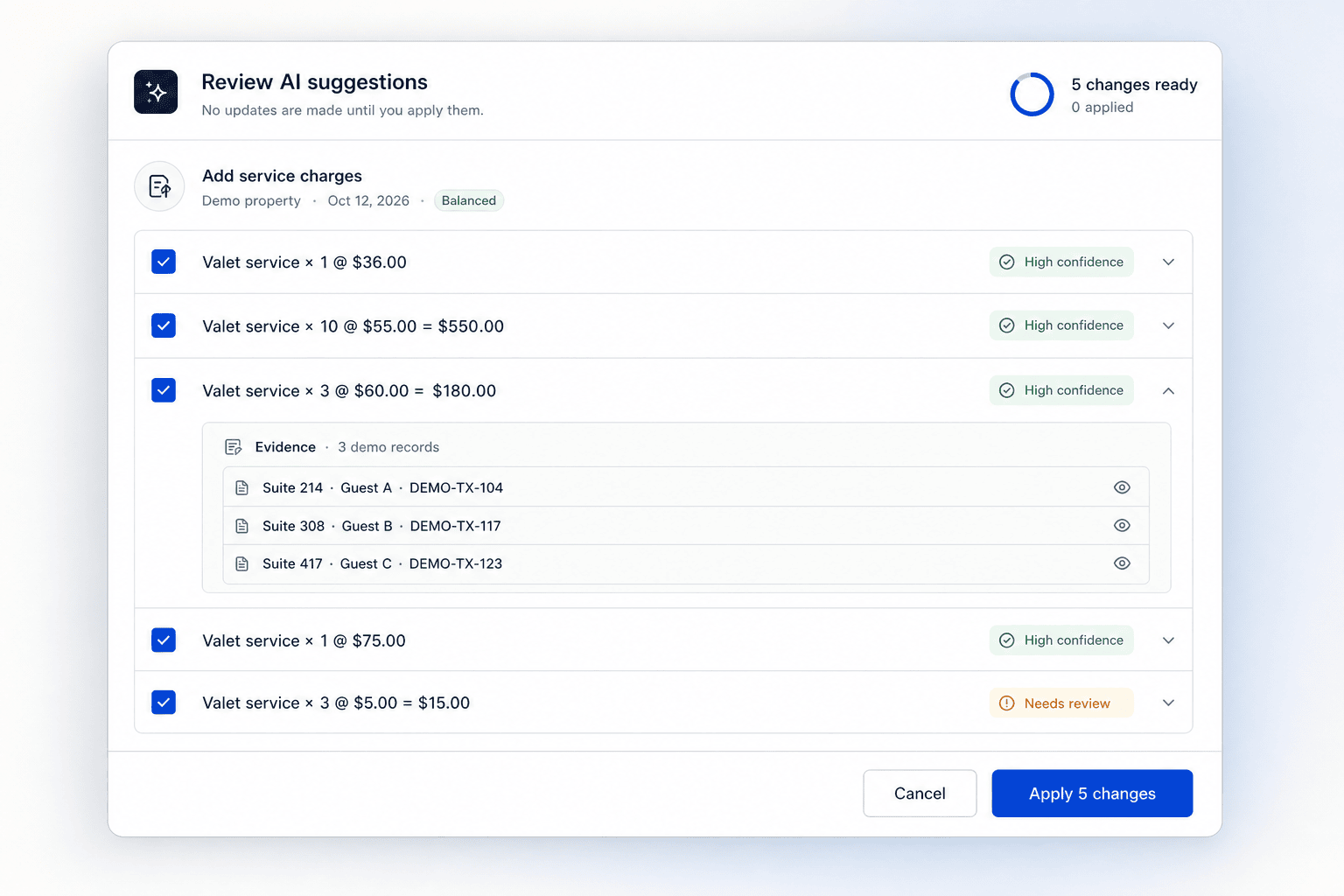
That review screen carries one more check worth stealing. Proposals include the model’s transcription of the document’s own printed total, and the interface compares it against the sum of the proposed rows, flagging anything over or short before a person reconciles by hand. No ground truth is required. The document grades the model.
This is product and UX design more than model engineering, and it is where AI adoption is won. People do not trust AI features because the accuracy number is high; they trust them because they can see what the AI did, override it in one click, and never get silently overruled.
What to ask a team that says it can ship AI
If you are buying this capability rather than building it, the demo you’ll be shown will look a great deal like our day-one demo. The questions that separate a demo team from a production team are the ones this article just walked through:
Show me the evaluation set.
How many real cases, and what did the scores change about the design?
What happens when the provider has an outage?
Listen for fallbacks, timeouts, retries, and queues, with numbers attached.
Where does cost per action live?
If tokens aren’t metered in the code, the answer is “in next month’s invoice.”
How will users see and override AI decisions?
Provenance labels, one-click rejection, and human review of low-confidence results.
What is monitored after launch?
Accuracy drifts as models, prompts, and real-world inputs change; someone has to be watching.
Black Airplane is an Atlanta-area product engineering company with a 100% USA-based, full-time, in-house team. The systems in this article are our team’s work, designed, built, and shipped by the same people we bring to every engagement. Our AI development work spans agents, retrieval-augmented search, MCP and product integrations, and the evaluation, monitoring, and fallback engineering that turns them into dependable software.
Frequently asked questions
Why do AI features fail in production?
Rarely because the model is bad, and usually because the system around it is missing. Production brings malformed inputs, provider outages, hedged responses, and edge cases the demo never met, and a feature with no evaluation set, no output contract, no fallback, and no answer for uncertainty meets all of them undefended. Reliability is a property of the whole system.
How do you make an LLM feature reliable enough for production?
Layer defenses that do not depend on one another: structured output through response schemas or forced tool use, parsing that records failures instead of crashing, queued jobs with retries and backoff, a second provider behind the same interface, and sanitization in code even when the prompt already forbids hedging. Then give every failure mode a designed user-facing state.
How do you move an AI proof of concept to production?
Measure it first: a golden set of real cases with known answers, and a harness that scores the whole pipeline rather than the model call alone. Size the set to the decision, since a wide gap between candidates needs far fewer cases than a close one. Let those numbers pick the model and prompt, then add contracts, fallbacks, queues, sanitization, cost accounting, confidence thresholds, and human review, re-running the benchmark after each change.
How much does an AI feature cost to run?
It depends on the model and the task, which is why the only honest answer is to meter it. Scope drives the bill more than model choice does: on a client’s document feature, narrowing the prompt to a single date cut a $6.46 run to $1.89 without changing models. Record input and output tokens from the first call, and cost per action becomes something you can design pricing around.
Do AI features need human review?
The good ones budget for it. Confidence scoring lets strong results flow automatically while weak ones are parked for a person, and the interface decides whether that reads as help or as friction: label what the AI did, make rejection one click, and keep its extracted work as a head start when someone rejects it. Human review is how users come to trust the results they don’t review.
How do you let an AI agent take actions safely?
Deny by default and make approval structural. Every drafted action starts at approval-required; the approval binds to the exact content approved, so an edited draft needs a fresh one; autonomy loosens only by explicit administrative decision; and irreversible actions get one attempt plus reconciliation rather than blind retries. The strongest form gives the model no write path at all, so it can only propose while a person’s own session does the writing.
Which AI model is best for production features?
The one that wins on your evaluation set, which is often not the one reputation would pick. An inexpensive model beat a larger one on our identification task at a third of the token cost, while on a different system’s conversational workload the cheap tier tied the mid tier and then regressed on reasoning-heavy work. Rankings are task-specific and change monthly, so a harness you can re-run is worth more than any of them.
The system around the call
The day-one demo of this identification feature and the version people rely on today make the same API call. Everything that changed is around that call, and none of it is visible to the person using the feature. What they see is that a job which used to take about ten minutes now takes about thirty seconds, and that the result is worth trusting without checking every field. All of it is buildable, measurable work.
If you have an AI feature in mind, or a proof of concept that needs to become a product, tell us what you are trying to build and we’ll show you what the path to production looks like for your case.